在 4.0 後,
Environment.getExternalStorageDirectory().getAbsolutePath();
得到的是內建的儲存空間
因為有些機種可以外接SD卡, 有些不行, 而 Android 沒有提供取得外接SD卡的方法,
2014年4月26日土曜日

2014年4月23日水曜日
Eclipse - Logcat
什麼是 Logcat ?
(暫無)
設定視窗( in Eclipse)
Window → Preferences → Android → Logcat
打開訊息視窗
Window → Show View → Other → Android → Logcat
2014年4月8日火曜日
Android - Toast 顯示很慢
Toast可以用來顯示音量改變或者保存更新消息,如果用戶一直點擊,Toast會排隊一個一個的,直到消息隊列全部顯示完,這樣的效果顯然是不好的,下面來看解決方法
Toast.makeText(activity, text, duration)每次會實例化一個Toast,所以
Toast.makeText(activity, text, duration)每次會實例化一個Toast,所以
01 if (toast != null) |
02 | { |
03 | toast.setText(text); |
04 | toast.setDuration(duration); |
05 | toast.show(); |
06 | } else |
07 | { |
08 | toast = Toast.makeText(activity, text, duration); |
09 | toast.show(); |
10 | } |
Android - Change Default Activity
Use the
AndroidManifest.xml
file, you can actually even have more than one launcher activity
specified in your application manifest. To make an activity seen on the
launcher you add these attributes to your activity in the manifest <intent-filter>
<action android:name="android.intent.action.MAIN" />
<category android:name="android.intent.category.LAUNCHER" />
</intent-filter>
Ref.http://stackoverflow.com/questions/3631982/change-applications-starting-activity-androidhttp://stackoverflow.com/questions/9704898/how-to-set-my-activity-as-main-activity-in-android 2014年4月5日土曜日
Android - java.lang.OutOfMemoryError 解決方法
01.
檢查一下程式裡頭的迴圈, 是不是太複雜了
02.
重新建立個虛擬 Android , 將 Heap 數值設定大一點
Ref.
完美解决java.lang.OutOfMemoryError: bitmap size exceeds VM budget
http://blog.csdn.net/yangxyjd/article/details/6932989
檢查一下程式裡頭的迴圈, 是不是太複雜了
02.
重新建立個虛擬 Android , 將 Heap 數值設定大一點
Ref.
[Java] java.lang.OutOfMemoryError 的解決方法
http://www.neo.com.tw/archives/482
http://www.neo.com.tw/archives/482
完美解决java.lang.OutOfMemoryError: bitmap size exceeds VM budget
http://blog.csdn.net/yangxyjd/article/details/6932989
2014年3月17日月曜日
TextView 設定粗體 斜體 底線
字型 TypeFace
字體 Font
----
You can set Directly in XML file in
字體 Font
----
textView.setTypeface(textView.getTypeface(), Typeface.BOLD);
textView.setTypeface(textView.getTypeface(), Typeface.ITALIC);
textView.setTypeface(textView.getTypeface(), Typeface.BOLD_ITALIC);You can set Directly in XML file in
<TextView />
like: android:textStyle="normal"
android:textStyle="normal|bold"
android:textStyle="normal|italic"
android:textStyle="bold"
android:textStyle="bold|italic"----Ref.http://www.advertisingfan.net/2011/05/fonts-vs-typeface.html
http://style77125tech.pixnet.net/blog/post/17032697-%5Bandroid%5D-%E6%8C%89%E9%88%95%E7%BD%AE%E6%8F%9B%E6%96%87%E5%AD%97%E9%A1%8F%E8%89%B2%E5%8F%8A%E5%AD%97%E5%9E%8B--typeface
從 xml 設定 TextView 字體大小
<TextView
android:id="@+id/textView1"
android:layout_width="wrap_content"
android:layout_height="wrap_content"
android:layout_alignParentTop="true"
android:layout_toRightOf="@+id/imageView1"
android:textSize = "44sp"
android:text="TextView" />
上述highline的地方,單位是sp 就可以設定文字大小
2014年3月1日土曜日
Android - Remove Title Bar & Notification Bar (Full Screen)
Remove Title Bar & Notification Bar (Full Screen)
(Hide Title Bar & ...)
我知道的方法大致上分為兩種,
01.寫在 java 程式碼裡頭
02.修改 Manifest 或者 xml
(Hide Title Bar & ...)
我知道的方法大致上分為兩種,
01.寫在 java 程式碼裡頭
02.修改 Manifest 或者 xml
2014年2月26日水曜日
使用google提供的driver來進行android程式實機測試
最近要拿 GT-i9000 來測試 剛寫好的程式
不過 eclipse 抓不到 i9000 ( DDMS 上面找不到 )
發現原來 沒灌 Samsung 的 kie ( 這東西裝完後會順便裝驅動程式 )
不過問題來了, 灌完 kie 之後還是抓不到,
( 使用裝置管理員去更新驅動一樣 )
不知道是否刷了第三方 ROM 的關係,
我又不想刷回官方 ROM ( 查了一下只到Android 2.3 左右 )
畢竟現在手上 i9000 的第三方 ROM 版本到 4.0.4
adb kill-server 也試過, 無效
adb devices 看不到裝置
偏偏 我的 mac 安裝完 Samsung 官網上面的 mac 版本 kie 之後
mac 版本的 eclipse 就抓到手上這隻 i9000 了
最後我嘗試使用 google 提供的 usb driver 就成功了
以下是安裝 google usb driver 的一些紀錄
首先 要先下載 google usb driver, 我是從 android-sdk 提供的 SDK Manager
更新抓到的

sdk 更新完成後, 可以在 sdk 底下 extra\google\usb_driver 找到該驅動程式
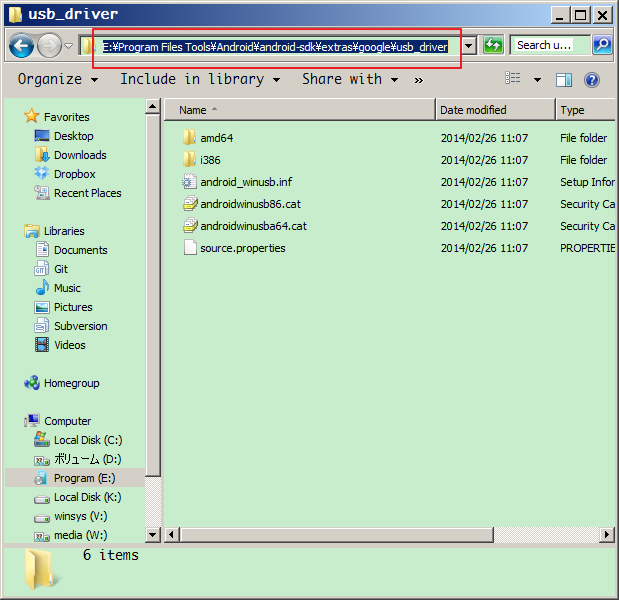
啟動 裝置管理員 對 有驚嘆號的 i9000 滑鼠右鍵 更新驅動程式
將驅動程式路徑指向上面 sdk 存放驅動的資料夾
然後更新完成 i9000 的裝置名稱會變成 Android Device

接著 啟動 eclipse , DDMS就可以看到 i9000 了

如果沒有的話 執行 reset adb 試試看

執行專案的時候就可以使用 i9000 來實機測試
(選擇視窗會自動跳出讓你選擇)

實機畫面:

Reference:
如何使用裝置來編程
http://developer.android.com/tools/device.html#setting-up
OEM USB Driver
http://developer.android.com/tools/extras/oem-usb.html#Win7
Google Android SDK Release Notes(search "USB Driver")
http://developer.android.com/sdk/RELEASENOTES.html
MS Windows x86 and x64 USB Drivers for Samsung Galaxy S
http://forum.xda-developers.com/showthread.php?t=728929
不過 eclipse 抓不到 i9000 ( DDMS 上面找不到 )
發現原來 沒灌 Samsung 的 kie ( 這東西裝完後會順便裝驅動程式 )
不過問題來了, 灌完 kie 之後還是抓不到,
( 使用裝置管理員去更新驅動一樣 )
不知道是否刷了第三方 ROM 的關係,
我又不想刷回官方 ROM ( 查了一下只到Android 2.3 左右 )
畢竟現在手上 i9000 的第三方 ROM 版本到 4.0.4
adb kill-server 也試過, 無效
adb devices 看不到裝置
偏偏 我的 mac 安裝完 Samsung 官網上面的 mac 版本 kie 之後
mac 版本的 eclipse 就抓到手上這隻 i9000 了
最後我嘗試使用 google 提供的 usb driver 就成功了
以下是安裝 google usb driver 的一些紀錄
首先 要先下載 google usb driver, 我是從 android-sdk 提供的 SDK Manager
更新抓到的
sdk 更新完成後, 可以在 sdk 底下 extra\google\usb_driver 找到該驅動程式
啟動 裝置管理員 對 有驚嘆號的 i9000 滑鼠右鍵 更新驅動程式
將驅動程式路徑指向上面 sdk 存放驅動的資料夾
然後更新完成 i9000 的裝置名稱會變成 Android Device
接著 啟動 eclipse , DDMS就可以看到 i9000 了
如果沒有的話 執行 reset adb 試試看
執行專案的時候就可以使用 i9000 來實機測試
(選擇視窗會自動跳出讓你選擇)
實機畫面:
Reference:
如何使用裝置來編程
http://developer.android.com/tools/device.html#setting-up
OEM USB Driver
http://developer.android.com/tools/extras/oem-usb.html#Win7
Google Android SDK Release Notes(search "USB Driver")
http://developer.android.com/sdk/RELEASENOTES.html
MS Windows x86 and x64 USB Drivers for Samsung Galaxy S
http://forum.xda-developers.com/showthread.php?t=728929
登録:
投稿 (Atom)